 AceThinker Recorder


HBO Max is a well-known streaming service that offers subscribers various programming options. It includes everything from current and popular TV shows to movies, documentaries, and even stand-up comedy specials. Additionally, you can enjoy watching unlimited films online with your family and friends. However, a subscription is one crucial requirement to unlock your favorite movie. Therefore, the best solution is to record if you want to share and save your watched movies to watch them at any time. In some situations, recording HBO Max is a great idea to save a copy of your favorite movie in case it is suddenly deleted from the list. This way, you can have your personal copy, which allows you to watch it at any time. In this article, we will discuss how to do this. Moreover, we will also explore the best third-party apps to record HBO Max.
| Sections | Brief Information |
|---|---|
| Is It Legal To Record HBO Max? | Know if recording HBO max is legal Learn More |
| How to Screen Record HBO Max on Windows and Mac | A step-by-step guide to capture HBO Max with great quality using Aqua Demo Learn More |
| How to Screen Record HBO Max on iOS | Straightforward steps for iOS users on recording HBO Max movies Learn More |
| How to Screen Record HBO Max on Android | Steps to easily grab HBO Max videos on any Android devices Learn More |
| Frequently Asked Questions | Question and answers about recording HBO Max Learn More |
Is It Legal To Record HBO Max?
Like many streaming services, recording content from HBO Max often falls under a mix of the platform's terms of service and copyright laws. Generally, recording or distributing content from HBO Max without permission is unlawful, as it violates copyright laws. However, personal use recording may be subject to different rules based on your location and specific cases. It's always a good idea to check the terms of service of HBO Max and consult local laws to ensure compliance before recording any content.

How to Screen Record HBO Max on Windows and Mac
Best for: The tool has a Task scheduler feature that allows you to schedule a recording or set a specific time to record your screen.
Supported Video Quality: This tool lets you save your recordings with the lossless quality of videos.
Did you know you can record HBO Go easily? Indeed, Aqua Demo is a powerful and user-friendly screen recorder that allows you to quickly and easily record your entire screen, a specific portion of the screen, or just a selected object. Additionally, this screen recorder with a highlighter features multiple options for screen recording on HBO Max. Specifically, two versions of the tool are available: the Free version and the Pro version. Once you purchase the Pro version, you can use its recording feature freely during the free trial and experience the professional recording process. You can follow the detailed steps below to achieve the best recording.
Step 1. Get the HBO Max Recorder
First, download Aqua Demo on your computer by clicking the "Download" button above. Make sure you have clicked the correct selection regarding your computer OS. Then, open the downloaded installation file and continue until it gets launched. Afterward, run the software on your screen to access its main interface.
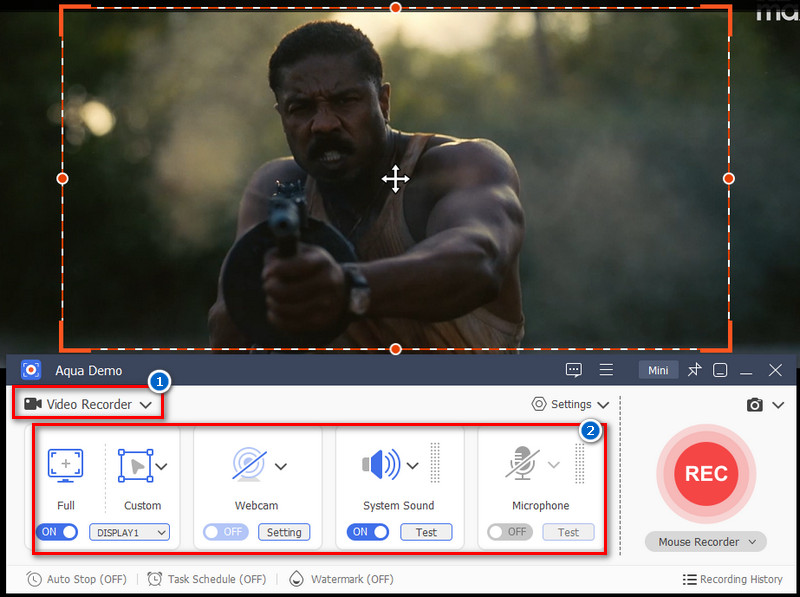
Step 2. Choose and Modify Video Recording
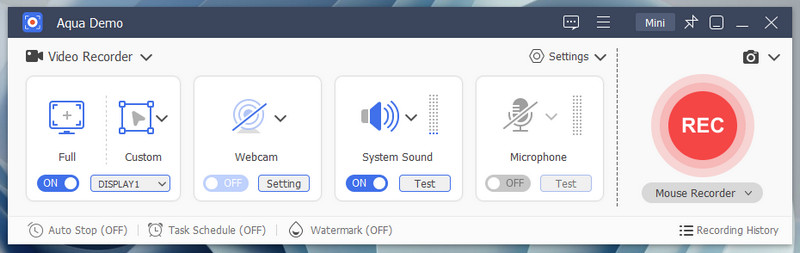
On the tool's main interface, choose "Video Recorder" as your recording option. Next, select the frame ratio to use. If you like to record the entire screen, click the "Full" button. Next, hit the "Custom" mode if you want to record a specific area on your screen. On the other hand, enable "System Sound" as the audio source. Webcam and Microphone are also available if you want to utilize them on your recording.
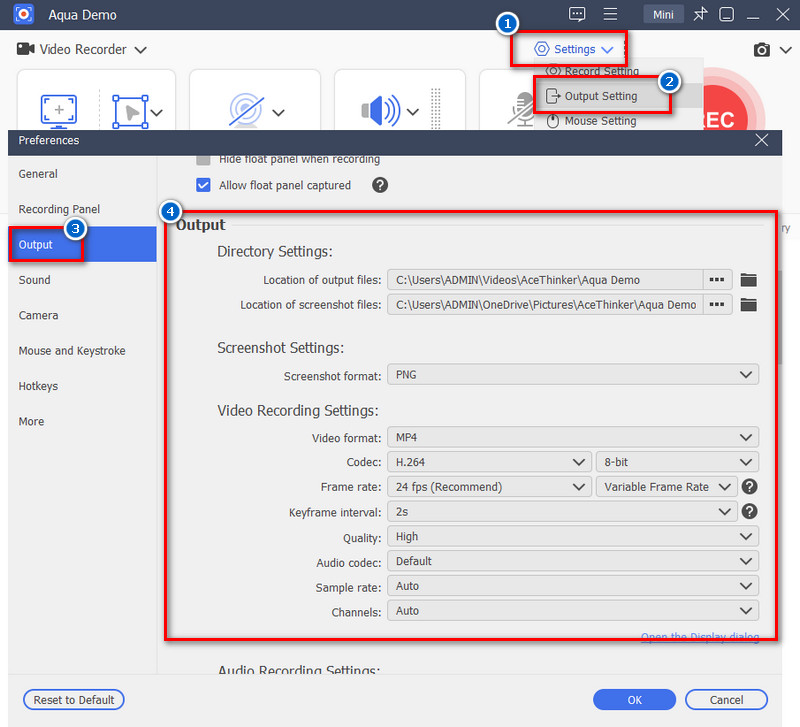
Step 3. Configure Output Settings
Next, navigate to the recording setting to complete the recording requirement you need. Simply, click the Settings dropdown and select Recorder Settings. Here, choose the "Output" menu to see the options for video output. First, you may be able to modify the "Directory Settings," where all of your video output will be saved. Then, select your preferred file format, quality, and the FPS of your video. Make sure you have set the recording requirement you need, and click "OK" to save the changes.
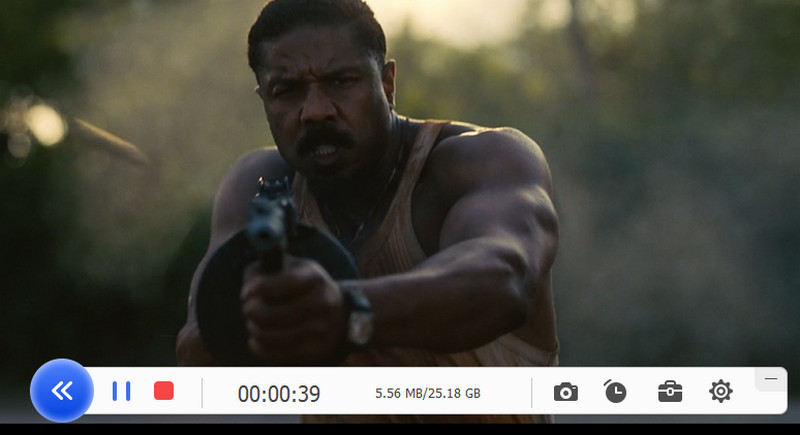
Step 4. Record HBO Max
To start the recording, press the "REC" button on the left-side corner of the tool's interface. The recording countdown will begin, and the tool will record instantly. Afterward, click the "Stop" button anytime you want to end the recording process.
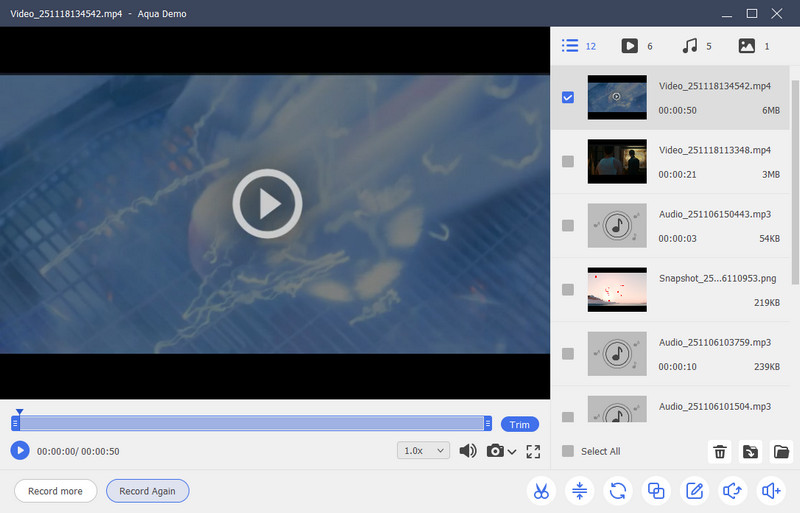
Step 5. Preview the Recordings
When you stop the recording, the playback window of your video will appear. Additionally, the recording will be automatically saved in the designated folder you selected earlier. All you have to do is preview the recorded video.
How to Screen Record HBO Max on iOS
Best for: The tool provides a multi-functional editing feature, like adding an intro and outro of the video.
Supported Video Quality: This tool supports 720p and 1080P video quality to save the best output.
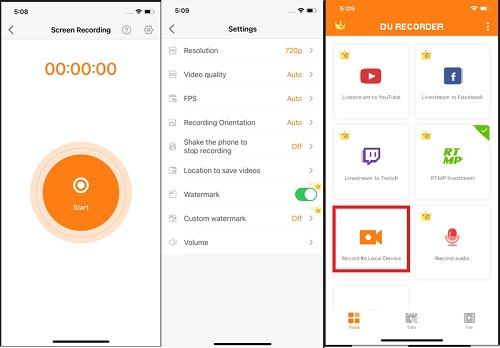
Like most people, you probably love watching your favorite HBO shows on your iOS device. Fortunately, there is a process for recording your favorite shows using an iPhone. DU Recorder is an HBO Max screen recorder with features designed to help the user record any activity on their device screen, including record Netflix, make tutorials, and edit the recorded video. Moreover, users can easily share the video via video-sharing sites like YouTube and Vimeo. On top of that, this helpful iPhone app offers recording options, including the ability to capture screens at up to 60 FPS. Follow the guide below to try the app on your iPhone device.
User Guide:
- To start, get the DU recorder on the App Store. Then, wait until the installation process is complete. Afterward, open the app's interface by tapping its tiny icon. Its simple interface will be displayed, and you can finally start the recording process using the tool.
- From the tool's provided features, choose the option "Record to Local Device." You can head to the tool's "Settings" before starting the recording process. There are options for resolution, video quality, FPS, and the volume for your audio sources.
- Subsequently, you can begin recording your screen. Click the "Start" button at the center of your screen. You can see the recording timer in the upper-left corner of the screen. When you have to finish the recording, go back to the screen recording interface and click the button in the center again to press "Stop."
How to Screen Record HBO Max on Android
Best for: It is best for accessing the screen recording with its visible floating window and notification bar.
Supported Video Quality: The app can save recordings in 720p to 1080p video quality output.
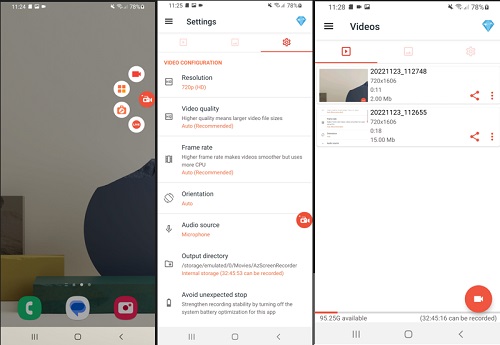
AZ Screen Recorder for Android is an excellent tool for screen recording HBO. Apart from recording on-screen activities for free, you can adjust the resolution and frame rate, draw on the screen, and even display screen touches when recording your video. Screen record HBO Max using the tool can capture internal sound and the entire device screen. Likewise, you can pause the recording process at any time and resume it from the same point. This easy-to-use app comes with controls that permit you to start recording immediately after opening the enchanted button overlay. You can also view your recordings and flip the forward-looking camera to add a window over your screen.
User Guide:
- You need to install an AZ Screen Recorder on your device. Then, simply search for it on the Google Play Store, click the "Install" button, and wait until it successfully launches on your screen.
- Next, on the tool's toolbar, tap on the app's icon to open the settings and configure the preferences for your video recording. The tool includes resolution, video quality, frame rate, and the option to choose an audio source.
- Then, tap the "Red" start recording icon on the app's overlay if you'd like to begin. The tool will run in the background and record any activities played on your screen normally. You can click the small app icon and the "pause" button to pause the recording, or click the "Stop" icon to end the process. All recorded videos will be saved automatically on your local device.
Frequently Asked Questions
Can you screen record HBO Max?
Yes, various screen recorder tools help users to save their favorite shows offline. If you're seeking an excellent screen recorder, utilize Aqua Demo. This tool contains all the necessary features to acquire high-quality video outputs. Besides, there is no need to look for other solutions since the tool has an intuitive interface suitable for all beginner users.

Does the HBO Max screen recorder have a watermark?
You can access Aqua Demo using its free trial version. Still, the tool lets users create numerous screen recordings and save them on a specific file location without watermarks on the videos. However, if you want to access the exclusive feature of the tool, get a premium subscription for only $29.95 per year. In this regard, the tool will grant all your video from HBO Max a great experience of recording.
Is there a "Record" button on HBO Max?
Yes! Just open the HBO Max app on your device and prepare a show or movie you want to record. To initiate the recording, go to the tool's homepage and click the tiny square icon located in the bottom-right corner of the HBO Max app. Then, select "Start Recording" to begin the recording process. Moreover, you can stop the recording by clicking "Stop Recording ." All recorded videos are located on your local device.